Wednesday, 24 September 2014

Consume Secured web service using proxy client in ADF

In last post i have discussed about how to expose Business component as Secured service ADF BC as secured service.It is very common requirement to consume secured web service in ADF applications.In this post i am going to cover the same use case. Now i am going to consume the same service URL as Web Service proxy client in ADF.

Create fusion web application

Right click on model and go to the web service and select Web Service Proxy.


provide the web service URL


 Click on next and select the oracle/wss_username_token_client_policy


Finally Click on next and finish.

This will generate client java class to test the service method. Provide the credentials to service as shown below.

Thanks :) Happy Learning :)

Tuesday, 23 September 2014

Expose ADF BC as secured web service

Hello everybody, Today in this post i am going to explain you how to expose ADF Business components as Secured web service (Authentication and authorization).
Create fusion web application and create business components for Employee Table i.e, Entity Object, View Object and Application module.


Next create view criteria based on departmentid as shown below


Now go to application module and create service interface and make sure you select the view criteria as shown below


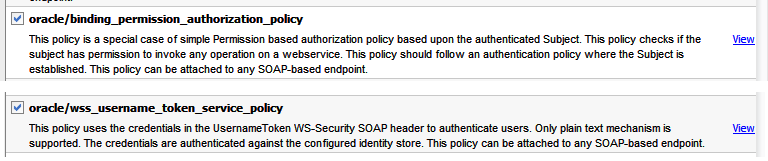
Next we need to add OWSM policies.

1. oracle/wss_username_token_service_policy (For authentication)
2. oracle/binding_permission_authorization_policy (For authorization)


Open the ApplicationModuleServiceImple.java select "AppModuleServiceImpl" from the structure window and go to property inspector and add the security policies on security attribute.


add the below given security policies.


Now enable security on adf application, Authentication and authorization. In jazn-data.xml, Create user and application role "Managers" and assign the resource to the manager as shown below


You can manually add in jazn-data.xml file as given below
  <jazn-realm default="jazn.com">
    <realm>
      <name>jazn.com</name>
      <users>
        <user>
          <name>user12</name>
          <display-name>user12</display-name>
          <credentials>{903}eQYtnsldQBALw0emi+VoIMG/WFBrGG48</credentials>
        </user>
      </users>
    </realm>
  </jazn-realm>
  <policy-store>
    <applications>
      <application>
        <name>CustomerHistory</name>
        <app-roles>
          <app-role>
            <name>managers</name>
            <class>oracle.security.jps.service.policystore.ApplicationRole</class>
            <members>
              <member>
                <name>user12</name>
                <class>oracle.security.jps.internal.core.principals.JpsXmlUserImpl</class>
              </member>
            </members>
          </app-role>
        </app-roles>
        <resource-types>
          <resource-type>
            <name>WSFunctionPermissionabc</name>
            <display-name>WSFunctionPermissionaa</display-name>
            <matcher-class>oracle.wsm.security.WSFunctionPermissionaaa</matcher-class>
            <actions-delimiter>,</actions-delimiter>
            <actions>invokeaa</actions>
          </resource-type>
        </resource-types>
        <jazn-policy>
          <grant>
            <grantee>
              <principals>
                <principal>
                  <name>managers</name>
                  <class>oracle.security.jps.service.policystore.ApplicationRole</class>
                </principal>
              </principals>
            </grantee>
            <permissions>
              <permission>
                <class>oracle.wsm.security.WSFunctionPermission</class>
                <name>/model/common/AppModuleService#findEmployeesView1EmployeesViewCriteria</name>
                <actions>invoke</actions>
              </permission>
            </permissions>
          </grant>
        </jazn-policy>
      </application>
    </applications>
  </policy-store>
</jazn-data>


Only users whose role is managers can access the view Criteria method. For other users it throws authorization exception.
Deploy and then test the service in Webservice tester.

Thanks :) Happy Learning :)  NK


Friday, 22 August 2014

Custom Login in ADF Application

We have used ADF security many more time with form based Authentication and Authorization using default login.html and error.html.
Suppose if we want to design our own login.jspx page and have complete control on ADF authentication then follow these steps.

1. Create Login.jspx and update the web.xml with login.jspx.

2. In login.jspx  add two input text with name (User name and password) and one button create managed bean  and  bind the input text with managed bean use the below code on button action event.

3. Add the following 3 jars in view controller project library

/MIDDLEWARE_HOME/modulescom.bea.core.weblogic.security.auth_xxxx.jar, /MIDDLEWARE_HOME/modulescom.bea.core.weblogic.security.identity_xxxxx.jar, /WLSERVER/serverlibwls-api.zip


import javax.faces.application.FacesMessage;
import javax.faces.context.FacesContext;
import javax.faces.event.ActionEvent;

import javax.security.auth.Subject;
import javax.security.auth.login.FailedLoginException;
import javax.security.auth.login.LoginException;
import javax.servlet.RequestDispatcher;
import javax.servlet.http.HttpServletRequest;
import javax.servlet.http.HttpServletResponse;

import oracle.adf.view.rich.component.rich.input.RichInputText;

import weblogic.security.URLCallbackHandler;
import weblogic.security.services.Authentication;
import weblogic.servlet.security.ServletAuthentication;


    public void executeLogin(ActionEvent actionEvent) {
        FacesContext ctx = FacesContext.getCurrentInstance();
        HttpServletRequest request =
            (HttpServletRequest)ctx.getExternalContext().getRequest();
        Subject mySubject;
        try {
            mySubject = Authentication.login(new URLCallbackHandler(uid.getValue().toString(), pwd.getValue().toString()));
            ServletAuthentication.runAs(mySubject, request);
            ServletAuthentication.generateNewSessionID(request);
            String loginUrl =
                "/adfAuthentication?success_url=/faces/main.jspx";
            HttpServletResponse response =
                (HttpServletResponse)ctx.getExternalContext().getResponse();
            RequestDispatcher dispatcher =
                request.getRequestDispatcher(loginUrl);
            dispatcher.forward(request, response);
        } catch (FailedLoginException e) {
            FacesMessage msg =
                new FacesMessage(FacesMessage.SEVERITY_ERROR, "Invalid username or password",
                                 "Invalid username or password");
            ctx.addMessage(null, msg);
        } catch (Exception e) {
            System.err.println(e.getMessage());
        }
       
    }

Happy Learning :)

Thursday, 21 August 2014

MAF: Data Control method returns Custom Type as array

In my previous post i have discussed about the Call Data control method from managed bean which return the Integer/String or and primitive data type.

But if your Data control method returns the Array of Custom data type Like Employees,Department etc. Use below code.

findEmployeesInDept is data control method which returns array of employees.

        pnames = new ArrayList();
        params = new ArrayList();
        ptypes = new ArrayList();
        
        pnames.add("findCriteria");
        params.add("10");
        ptypes.add(String.class);
       
        //end - WS empty params

        List l = new ArrayList();
        try 
        {    
            GenericType result = (GenericType)AdfmfJavaUtilities.invokeDataControlMethod("HRDC", null, "findEmployeesInDept",pnames, params, ptypes);
            if(result!=null)
            {
                for (int i = 0; i < result.getAttributeCount(); i++) 
                {
                    GenericType r = (GenericType)result.getAttribute(i);
                    Employees wd = (Employees)GenericTypeBeanSerializationHelper.fromGenericType(Employees.class, r);
                    l.add(wd);
                }
            }
        } 
        catch (AdfInvocationException e) 
        {
            e.getMessage();
        }

Thanks
Happy Learning.

Sunday, 17 August 2014

invokeContainerJavaScript method call TimeOut after 15 seconds

In Oracle MAF When you call the javascript function which have alter statement, If you don't close the alert box with in 15 sec on runtime then you will get below Java script time out error.

To resolve this issue, handle the exception as given below. Because the java script method which have the alert statement will throw the AdfException if the alert box is not closed with in 15 secs.


        try {
            AdfmfContainerUtilities.invokeContainerJavaScriptFunction("com.psihcm.ihcmMain", "mandatory",
                                                                      new Object[] { msg });

        } catch (AdfException e) {


        }


Call Data Control method from managed bean in MAF

If you have requirement to call the Data Control method from managed bean, Use AdfmfJavaUtilities.invokeDataControlMethod(). Below is complete code


Data Control method name is calculateDays with three argument of String type. In below method "iHCMWSClient" (name of the data control).

        List pnames1 = new ArrayList();
        List params1 = new ArrayList();
        List ptypes1 = new ArrayList();

        pnames1.add("arg0"); //start date
        ptypes1.add(String.class);
        params1.add(TimeShift.convertStringToDate(startDate));

        pnames1.add("arg1"); //endDate
        ptypes1.add(String.class);
        params1.add(TimeShift.convertStringToDate(endDate));

        pnames1.add("arg2"); //personID
        ptypes1.add(String.class);
        params1.add(new AbsenceRequest().getpID());

        System.out.println("%%%%% result" + noOfDays);
        try {
            noOfDays =
                    (String)AdfmfJavaUtilities.invokeDataControlMethod("iHCMWSClient", null, "calculateDays", pnames1, params1, ptypes1);

    System.out.println("%%%%% result" + noOfDays);
     
        } catch (AdfInvocationException e) {
            throw new AdfException("error ", AdfException.ERROR);
        }


Calling Java Script function from java bean class in MAF

Hi

Sometimes you may get requirement to call javascript function from bean class, Use below invokeContainerJavaScriptFunction() to call the Javascript function.

doAlert() is JS function with one argument.

                AdfmfContainerUtilities.invokeContainerJavaScriptFunction("com.ihcmMobile.Absence", "doAlert",
                                                                          new Object[] { " Absence Record Already Exist " });


JS Function:

doAlert = function () {
        var args = arguments;
        var str = ""+ args[0];
        alert(str);  //Absence Record Already Exist  gets printed

    };