Showing posts with label ADF BC. Show all posts

Friday, 3 June 2016

Dependent LOV's on required fields in ADF

Very often it happened to implement dependent LOV's on required attributes in ADF. In this post i will show you how we can implements such use case. Implementing  dependent on non required attributes is quite easy.
Lets take Employees table from HR schema and create ADF BC on employees table. Am using jdev 12.2.1.

Step1. Create dependent LOV's on DepartmentId and LastName attribute and add the partial trigger on last name and auto submit = true on DepartmentId and run the page. Try to change the departmentId value from list and then the problem comes 


Issue: In some departments there is no employees Example 170 - Manufacturing then you will see some required validation message.


To fix such issues follow the below steps 

Step2: Create valueChange event on department id and place the below code 


Run the page.


Cheers :) Happy Learning :)


Thursday, 12 February 2015

Insert new row at end of ADF table

Hi All, In today's post i will explain you how to insert new row at the end of table. By default when we click on CreateInsert button it creates a new row at first index of table. But some times we may get requirement to create row at last index of table.

Default CreateInsert at first index in ADF table


Now to add the row at last index as shown below.

We need to override the insertRow(Row row) method of ViewObjectImpl class.


Now run the jspx page and click on CreateInsert button. It creates the row at last index.

Thanks :) Happy Learning :)

Tuesday, 4 November 2014

Setting session scope variable to ADF BC View Object bind variable

In this post i am going to explain you how to set the session scope value to ADF BC View Object bind variable. Some times most of the View Objects will be based on some criteria and the bind variable value should based on specific user login. In this case follow the below steps.
Firstly I would like to thank for writing this post andrejusb post. But in this post he didn't describe about setting the session scope value to view object. If you have simillar requirement follow the below steps.

To set variable in session scope i have used the below code in the managed bean on button click. You can also use Managed bean which is in the session sope.


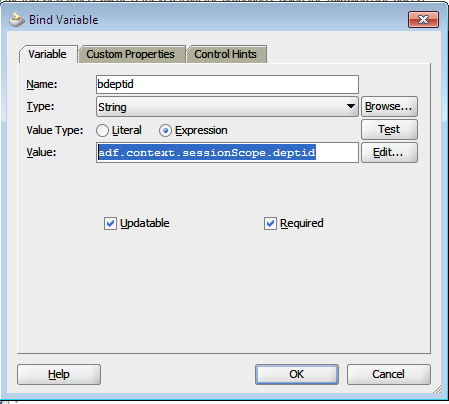
Now create bind variable in view object and set the expession shown below.


I used Department table here. Modify accordingly based on your use case.


Thanks :) and Happy Learning :)