Friday, 3 June 2016

Dependent LOV's on required fields in ADF

Very often it happened to implement dependent LOV's on required attributes in ADF. In this post i will show you how we can implements such use case. Implementing  dependent on non required attributes is quite easy.
Lets take Employees table from HR schema and create ADF BC on employees table. Am using jdev 12.2.1.

Step1. Create dependent LOV's on DepartmentId and LastName attribute and add the partial trigger on last name and auto submit = true on DepartmentId and run the page. Try to change the departmentId value from list and then the problem comes 


Issue: In some departments there is no employees Example 170 - Manufacturing then you will see some required validation message.


To fix such issues follow the below steps 

Step2: Create valueChange event on department id and place the below code 


Run the page.


Cheers :) Happy Learning :)


Saturday, 5 March 2016

Oracle MAF Pull to Refresh component

The new MAF 2.2 Version have various new components one of the them is Refresh component.
Instead of displaying a refresh button to a user, you can use this component to expose the concept of refreshing as a gesture. Use listView inside of this container. When the user drags their finger down anywhere within this container, a determination will be made to see whether any component between the container and the finger is not scrolled to its top. 

For more information about amx:refreshContainer follow oracle doc here

Step1: create a list view as shown below


Step2: surround list view component with amx:refreshContainer


Setp3: provide the required attributes to refresh container component


Output: Pull down the list view


Thanks :) Happy Learning :)


Wednesday, 24 June 2015

Access client machine printer using PrinterJob in Oracle ADF

Hi Folks this post is about accessing client machine printer using java PrinterJob in ADF application. Sometimes we may get requirement to handle windows printer like "Direct printing without print dialog box". You cannot customize the windows printer.
By using the Java PrinterJob you can completely handle print dialog and its properties from java. For more information on java PritnerJob check this
This can be achieved using Applet integration in ADF page.  For applet integration in ADF page go through my previous post Get Client machine MAC address in ADF using applet

Follow same steps given in my previous post.
In Messageapplet class add the following java code


Build the jar file and integrate in adf  project. Below is java script call the applet method on button click.


Run the jspx page. Print dialog is of java not windows print dialog.


Download here
Cheers :) Happy Learning :)


Monday, 22 June 2015

Get Client machine MAC address in ADF using applet

Hi folks in this post i will show you how to get client machine MAC address in ADF page using applet.
Step1: Create Generic application. and create java class which extends JApplet.

Step2:  Add the below shown java code. This code use to read the client machine MAC address.


Step 3: Create JAR file for this project and sign the jar file. This link will hep you to sign the jar

Step 4: Create Fusion Web application and add the jar file in public_html folder as shown below


Step 5: Now create jspx page with one button. When you click on button the MAC address displays in POP up. Using javascript will call the applet code and get the mac address.


Step6: Run the jspx page and click on get client mac address button


You can download the code using the link Download

Thanks:) Happy learning:)


Saturday, 30 May 2015

Display Remote Server Images in OracleMAF

Hi folks in this post i will show you how to display remote server image in Oracle MAF application.
Recently i have got requirement to display the images of remote servers in MAF application.
Generally in ADF web application if we add URL to Source attribute it will display image in page. But same will not work with MAF application.


Now Follow the below steps

Step 1:

I'll take google image here. Using below URL you can access the image
http://www.google.co.in/images/srpr/logo11w.png

Now we will display the same image in Oracle MAF application

Step 2:

Create MAF application and add amx page in maf-feature.xml

Step 3:

Add image tag with URL as shown below

 <amx:image id="i1" source="http://www.google.co.in/images/srpr/logo11w.png" inlineStyle="height:20%; width:30%;"/>

Step 4:

Open maf-application.xml file and go to security tab and add the domian in URL whitelist as shown below


Output:


Thursday, 12 February 2015

Insert new row at end of ADF table

Hi All, In today's post i will explain you how to insert new row at the end of table. By default when we click on CreateInsert button it creates a new row at first index of table. But some times we may get requirement to create row at last index of table.

Default CreateInsert at first index in ADF table


Now to add the row at last index as shown below.

We need to override the insertRow(Row row) method of ViewObjectImpl class.


Now run the jspx page and click on CreateInsert button. It creates the row at last index.

Thanks :) Happy Learning :)

Thursday, 6 November 2014

Disable Past dates and future dates in ADF Input Date

Hi all, In today's post i am going to explain you how to disable past date and future date for Input Date component. Sometime you get requiment to disable the past dates and future date also. This post can help you.

My requirement is to show only today and tomorrow's date and rest all need to disable. User should not select othere then these dates.
There are two attributes in inputDate component MinValue and MaxValue.

1. MinValue attribute is used to disable the back dates.

2. MaxValue attribute is used to disable the forward dates.

I have create one bean and two methods as show below

  private Date minDate = new Date();

    public Date getMaxDateVal() {
        Calendar cal = Calendar.getInstance();
        cal.setTime(new Date());
        cal.add(Calendar.DATE, 1); 
        return cal.getTime();

    }

cal.add(Calendar.DATE, 1);  // how many forwarding dates need to enable, In my requirement i should show tomorrow date, sho i have mentioned "1".


    public Date getMinDate() {
    try {
                Calendar cal = Calendar.getInstance();
    java.util.Date date = cal.getTime();
    DateFormat formatter = new SimpleDateFormat("yyyy-MM-dd");
                String currentDate = formatter.format(date);
    minDate = formatter.parse(currentDate);
  
    return formatter.parse(currentDate);
            } catch (Exception e) {
    return null;
            }
        }


jspx page code is  below.

 <af:inputDate label="Label 1" id="id1"
                      binding="#{viewScope.DateBean.testdate}"
                      maxValue="#{viewScope.DateBean.maxDateVal}"
                      minValue="#{viewScope.DateBean.minDate}"/>

 Run the page.


Thanks :)  Happy Learning :)


Tuesday, 4 November 2014

Setting session scope variable to ADF BC View Object bind variable

In this post i am going to explain you how to set the session scope value to ADF BC View Object bind variable. Some times most of the View Objects will be based on some criteria and the bind variable value should based on specific user login. In this case follow the below steps.
Firstly I would like to thank for writing this post andrejusb post. But in this post he didn't describe about setting the session scope value to view object. If you have simillar requirement follow the below steps.

To set variable in session scope i have used the below code in the managed bean on button click. You can also use Managed bean which is in the session sope.


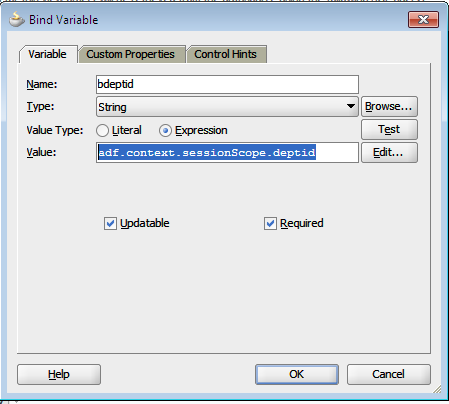
Now create bind variable in view object and set the expession shown below.


I used Department table here. Modify accordingly based on your use case.


Thanks :) and Happy Learning :)


Wednesday, 24 September 2014

Consume Secured web service using proxy client in ADF

In last post i have discussed about how to expose Business component as Secured service ADF BC as secured service.It is very common requirement to consume secured web service in ADF applications.In this post i am going to cover the same use case. Now i am going to consume the same service URL as Web Service proxy client in ADF.

Create fusion web application

Right click on model and go to the web service and select Web Service Proxy.


provide the web service URL


 Click on next and select the oracle/wss_username_token_client_policy


Finally Click on next and finish.

This will generate client java class to test the service method. Provide the credentials to service as shown below.

Thanks :) Happy Learning :)

Tuesday, 23 September 2014

Expose ADF BC as secured web service

Hello everybody, Today in this post i am going to explain you how to expose ADF Business components as Secured web service (Authentication and authorization).
Create fusion web application and create business components for Employee Table i.e, Entity Object, View Object and Application module.


Next create view criteria based on departmentid as shown below


Now go to application module and create service interface and make sure you select the view criteria as shown below


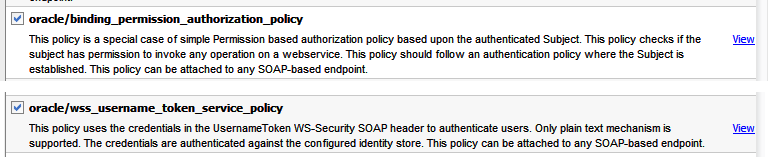
Next we need to add OWSM policies.

1. oracle/wss_username_token_service_policy (For authentication)
2. oracle/binding_permission_authorization_policy (For authorization)


Open the ApplicationModuleServiceImple.java select "AppModuleServiceImpl" from the structure window and go to property inspector and add the security policies on security attribute.


add the below given security policies.


Now enable security on adf application, Authentication and authorization. In jazn-data.xml, Create user and application role "Managers" and assign the resource to the manager as shown below


You can manually add in jazn-data.xml file as given below
  <jazn-realm default="jazn.com">
    <realm>
      <name>jazn.com</name>
      <users>
        <user>
          <name>user12</name>
          <display-name>user12</display-name>
          <credentials>{903}eQYtnsldQBALw0emi+VoIMG/WFBrGG48</credentials>
        </user>
      </users>
    </realm>
  </jazn-realm>
  <policy-store>
    <applications>
      <application>
        <name>CustomerHistory</name>
        <app-roles>
          <app-role>
            <name>managers</name>
            <class>oracle.security.jps.service.policystore.ApplicationRole</class>
            <members>
              <member>
                <name>user12</name>
                <class>oracle.security.jps.internal.core.principals.JpsXmlUserImpl</class>
              </member>
            </members>
          </app-role>
        </app-roles>
        <resource-types>
          <resource-type>
            <name>WSFunctionPermissionabc</name>
            <display-name>WSFunctionPermissionaa</display-name>
            <matcher-class>oracle.wsm.security.WSFunctionPermissionaaa</matcher-class>
            <actions-delimiter>,</actions-delimiter>
            <actions>invokeaa</actions>
          </resource-type>
        </resource-types>
        <jazn-policy>
          <grant>
            <grantee>
              <principals>
                <principal>
                  <name>managers</name>
                  <class>oracle.security.jps.service.policystore.ApplicationRole</class>
                </principal>
              </principals>
            </grantee>
            <permissions>
              <permission>
                <class>oracle.wsm.security.WSFunctionPermission</class>
                <name>/model/common/AppModuleService#findEmployeesView1EmployeesViewCriteria</name>
                <actions>invoke</actions>
              </permission>
            </permissions>
          </grant>
        </jazn-policy>
      </application>
    </applications>
  </policy-store>
</jazn-data>


Only users whose role is managers can access the view Criteria method. For other users it throws authorization exception.
Deploy and then test the service in Webservice tester.

Thanks :) Happy Learning :)  NK


Friday, 22 August 2014

Custom Login in ADF Application

We have used ADF security many more time with form based Authentication and Authorization using default login.html and error.html.
Suppose if we want to design our own login.jspx page and have complete control on ADF authentication then follow these steps.

1. Create Login.jspx and update the web.xml with login.jspx.

2. In login.jspx  add two input text with name (User name and password) and one button create managed bean  and  bind the input text with managed bean use the below code on button action event.

3. Add the following 3 jars in view controller project library

/MIDDLEWARE_HOME/modulescom.bea.core.weblogic.security.auth_xxxx.jar, /MIDDLEWARE_HOME/modulescom.bea.core.weblogic.security.identity_xxxxx.jar, /WLSERVER/serverlibwls-api.zip


import javax.faces.application.FacesMessage;
import javax.faces.context.FacesContext;
import javax.faces.event.ActionEvent;

import javax.security.auth.Subject;
import javax.security.auth.login.FailedLoginException;
import javax.security.auth.login.LoginException;
import javax.servlet.RequestDispatcher;
import javax.servlet.http.HttpServletRequest;
import javax.servlet.http.HttpServletResponse;

import oracle.adf.view.rich.component.rich.input.RichInputText;

import weblogic.security.URLCallbackHandler;
import weblogic.security.services.Authentication;
import weblogic.servlet.security.ServletAuthentication;


    public void executeLogin(ActionEvent actionEvent) {
        FacesContext ctx = FacesContext.getCurrentInstance();
        HttpServletRequest request =
            (HttpServletRequest)ctx.getExternalContext().getRequest();
        Subject mySubject;
        try {
            mySubject = Authentication.login(new URLCallbackHandler(uid.getValue().toString(), pwd.getValue().toString()));
            ServletAuthentication.runAs(mySubject, request);
            ServletAuthentication.generateNewSessionID(request);
            String loginUrl =
                "/adfAuthentication?success_url=/faces/main.jspx";
            HttpServletResponse response =
                (HttpServletResponse)ctx.getExternalContext().getResponse();
            RequestDispatcher dispatcher =
                request.getRequestDispatcher(loginUrl);
            dispatcher.forward(request, response);
        } catch (FailedLoginException e) {
            FacesMessage msg =
                new FacesMessage(FacesMessage.SEVERITY_ERROR, "Invalid username or password",
                                 "Invalid username or password");
            ctx.addMessage(null, msg);
        } catch (Exception e) {
            System.err.println(e.getMessage());
        }
       
    }

Happy Learning :)

Thursday, 21 August 2014

MAF: Data Control method returns Custom Type as array

In my previous post i have discussed about the Call Data control method from managed bean which return the Integer/String or and primitive data type.

But if your Data control method returns the Array of Custom data type Like Employees,Department etc. Use below code.

findEmployeesInDept is data control method which returns array of employees.

        pnames = new ArrayList();
        params = new ArrayList();
        ptypes = new ArrayList();
        
        pnames.add("findCriteria");
        params.add("10");
        ptypes.add(String.class);
       
        //end - WS empty params

        List l = new ArrayList();
        try 
        {    
            GenericType result = (GenericType)AdfmfJavaUtilities.invokeDataControlMethod("HRDC", null, "findEmployeesInDept",pnames, params, ptypes);
            if(result!=null)
            {
                for (int i = 0; i < result.getAttributeCount(); i++) 
                {
                    GenericType r = (GenericType)result.getAttribute(i);
                    Employees wd = (Employees)GenericTypeBeanSerializationHelper.fromGenericType(Employees.class, r);
                    l.add(wd);
                }
            }
        } 
        catch (AdfInvocationException e) 
        {
            e.getMessage();
        }

Thanks
Happy Learning.

Sunday, 17 August 2014

invokeContainerJavaScript method call TimeOut after 15 seconds

In Oracle MAF When you call the javascript function which have alter statement, If you don't close the alert box with in 15 sec on runtime then you will get below Java script time out error.

To resolve this issue, handle the exception as given below. Because the java script method which have the alert statement will throw the AdfException if the alert box is not closed with in 15 secs.


        try {
            AdfmfContainerUtilities.invokeContainerJavaScriptFunction("com.psihcm.ihcmMain", "mandatory",
                                                                      new Object[] { msg });

        } catch (AdfException e) {


        }


Call Data Control method from managed bean in MAF

If you have requirement to call the Data Control method from managed bean, Use AdfmfJavaUtilities.invokeDataControlMethod(). Below is complete code


Data Control method name is calculateDays with three argument of String type. In below method "iHCMWSClient" (name of the data control).

        List pnames1 = new ArrayList();
        List params1 = new ArrayList();
        List ptypes1 = new ArrayList();

        pnames1.add("arg0"); //start date
        ptypes1.add(String.class);
        params1.add(TimeShift.convertStringToDate(startDate));

        pnames1.add("arg1"); //endDate
        ptypes1.add(String.class);
        params1.add(TimeShift.convertStringToDate(endDate));

        pnames1.add("arg2"); //personID
        ptypes1.add(String.class);
        params1.add(new AbsenceRequest().getpID());

        System.out.println("%%%%% result" + noOfDays);
        try {
            noOfDays =
                    (String)AdfmfJavaUtilities.invokeDataControlMethod("iHCMWSClient", null, "calculateDays", pnames1, params1, ptypes1);

    System.out.println("%%%%% result" + noOfDays);
     
        } catch (AdfInvocationException e) {
            throw new AdfException("error ", AdfException.ERROR);
        }


Calling Java Script function from java bean class in MAF

Hi

Sometimes you may get requirement to call javascript function from bean class, Use below invokeContainerJavaScriptFunction() to call the Javascript function.

doAlert() is JS function with one argument.

                AdfmfContainerUtilities.invokeContainerJavaScriptFunction("com.ihcmMobile.Absence", "doAlert",
                                                                          new Object[] { " Absence Record Already Exist " });


JS Function:

doAlert = function () {
        var args = arguments;
        var str = ""+ args[0];
        alert(str);  //Absence Record Already Exist  gets printed

    };


Error while deploying MAF app to android - Cannot run program "\sdk\tools\zipalign"

Hi

If you are getting the below error while deploying the application to android. Here is the solution

[11:11:31 AM] Cannot run program "\sdk\tools\zipalign"": CreateProcess error=2, The system cannot find the file specified
[11:11:31 AM] CreateProcess error=2, The system cannot find the file specified

During the deployment jdeveloper creates .apk file using zipalign.exe file. But zipaling.exe is not exist in this location C:\Program Files\Android\sdk\tools\zipalign.

Solution is copy the zipaling.exe from   \build-tools\19.1.0  to \sdk\tools folder.


Getting Started With Oracle MAF

Oracle MAF:


Oracle MAF (Mobile Application Framework) is a hybrid-mobile framework that enables developers to rapidly develop single-source applications and deploy to both the Apple iOS and Google Android platforms. Oracle MAF provides a complete MVC development framework - that leverage Java, HTML5 and JavaScript - with declarative user interface definition, device services integration and built-in security. Oracle MAF maximizes code reuse and results in faster development of compelling mobile applications.


Features and Benefits


  • Develop once, deploy to multiple mobile devices and platforms including iOS and Android
  • Choose your preferred development language Java or JavaScript
  • Leverage Over 80 components for simpler development of richer user interfaces
  • Accelerate development through visual & declarative application development
  • Choose your preferred IDE - Oracle JDeveloper or Eclipse
  • Access native device services, such as phone, SMS, camera, GPS and more
  • Integrate both on-device and browser-based mobile interfaces into the same applications

For More information on Oracle MAF go through the link Oracle MAF


Tuesday, 17 June 2014

Book Review: Oracle ADF Faces Cookbook by Amr Gawish


The book contains10 chapters:
  1. Building Your ADF Faces Environment From the Ground Up

  2. Getting Started with ADF Faces and JDeveloper

  3. Presenting Data Using ADF Faces

  4. Using Common ADF Faces Components

  5. Beautifying the Application Layout for Great User Experience

  6. Enriching User Experience with Visualization Components

  7. Handling Events and Partial Page Rendering

  8. Validating and Converting Inputs

  9. Building Your Application for Reuse

  10. Scaling your ADF Faces Application
This book makes you more expertise in Oracle ADF faces, Novice developers feels little bit difficult to understand the concepts because the book uses its own DB schema and it will be difficult to understand the ADF Business components layer its pre-built.

The book is good for the experience developers, who can aware of more adf faces components in Jdeveloper 12.1.2.0.0 .
Interesting part is the book tells about the skins, layouts and other components exist in jdev 12c. It also proved the sample applications to practice. Some of the chapters are really interesting like event handling, Active data services etc.

You can purchase the book from the below site

Thursday, 22 May 2014

Add CSS to af:table column header in ADF page

Hi, In this post i am going to show you how to add the css to column header of af:table

Step1: Create the ADF Skin file (.css file)

Step2: Create the css class as shown below

.head{
font-size: 20.0pt;
font-weight: bold;
color: Red;

}

Step3: Call the css class on af:column  (headerClass="head")

Step4: Run the page.


Thanks :) happy learning :)

Wednesday, 21 May 2014

Convert input text Content to Upper Case or Lower Case

In this post i am going to talk about converting lower case data to upper case (or Upper Case data to Lower Case). There are multiple solutions to achieve this but i am showing there different methods.

1. you can use contentStyle="text-transform:uppercase;" on input text field.
        --text-transform:lowercase;
   
       
2. Using java script code

<af:resource type="javascript">
      function convertToUpperCase(evt){
        var field = evt.getCurrentTarget();
        var fieldVal= field .getSubmittedValue();
        field .setValue(fieldVal.toUpperCase());        
    }
    </af:resource>


 <af:inputText label="Label 1" id="it1">
                <af:clientListener method="convertToUpperCase" type="valueChange"/>
              </af:inputText>


3. You can create ViewRowImpl.java class with accessors and use toUpperCase() of String class

    public void setFirstName(String value) {
        setAttributeInternal(FIRSTNAME, value.toUpperCase());
    }


Thanks :) Happy Learning :)